課題解決

課題解決


情報・インサイト
Javaを使用しPDFのテンプレートを作成する方法を紹介しようと思います。
今回は、「JaspersoftStudio」というツールを使用しテンプレートを作成します。
また、eclipseの動作環境はすでに構築済みという前提ですので、あらかじめご了承ください。
グラフ、画像、罫線をGUIで簡単に配置し、テンプレートを作成することができます。
そして、内部ではxmlが作成されており、もちろんxmlのコーディングを行うこともできます。
今回は、GUIで簡単にテンプレートを作成する方法を紹介したいと思います。
・JaspersoftStudio
JaspersoftStudioをインストール
↓
テンプレート作成
↓
フォント設定
↓
Javaでテンプレートに値を当てはめ、出力
https://community.jaspersoft.com/project/jaspersoft-studio/releases
上記のリンクから「TIB_js-studiocomm_6.6.0_windows_x86.exe」を選択し、インストール
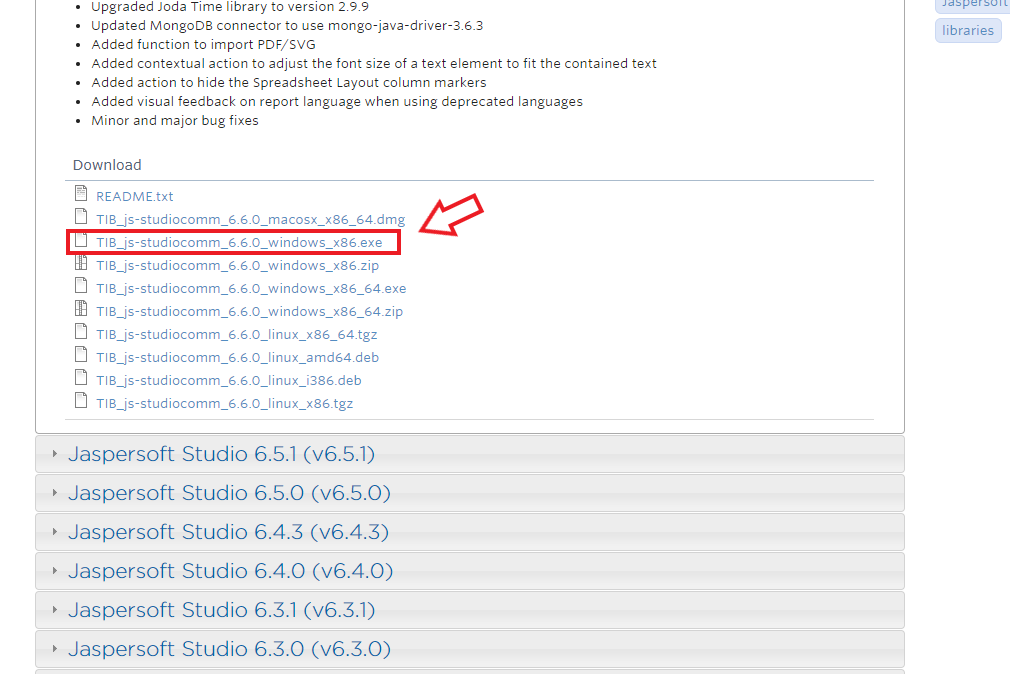
※インストールする際、ログイン、新規登録などを求められますが、特に問題ないので、登録しちゃいましょう
インストールが完了するとこんな画面が立ち上がったと思います。
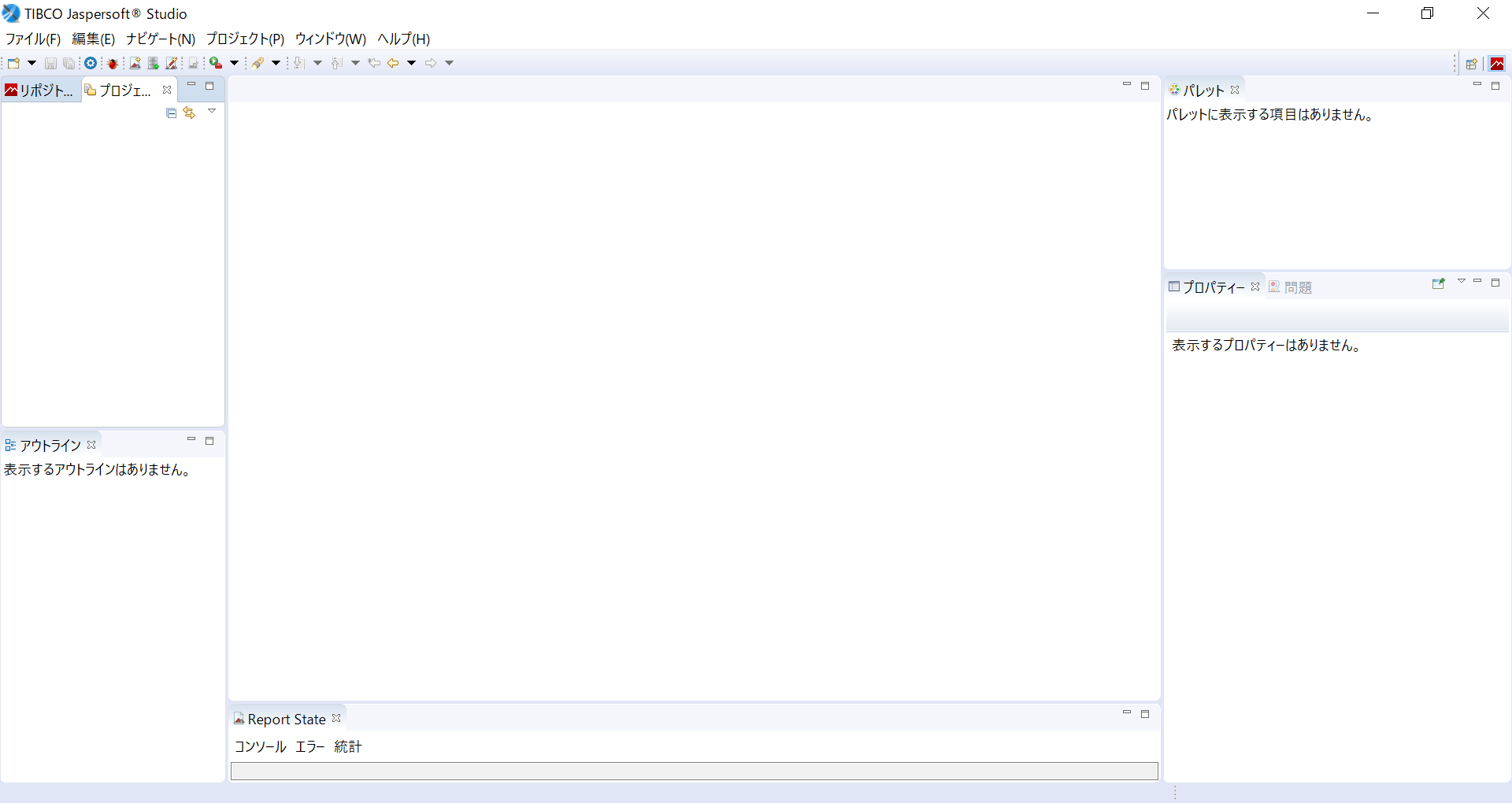
「ファイル」→「新規」→「プリジェクト」を選択
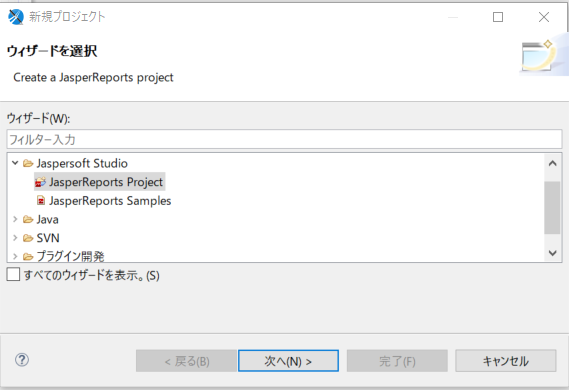
「JasperReports Project」を選択し次へ
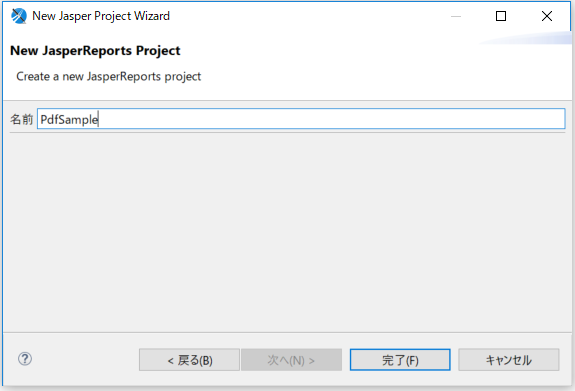
プロジェクト名を決めて完了をクリック
これで左上のプロジェクト一覧に作成されているのを確認出来たら完成です。
先ほど作成したプロジェクトを選択し、左クリック
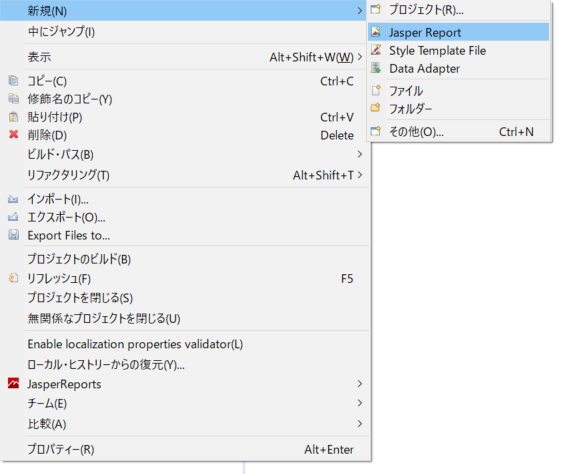
「新規」→「Jasper Reports」を選択
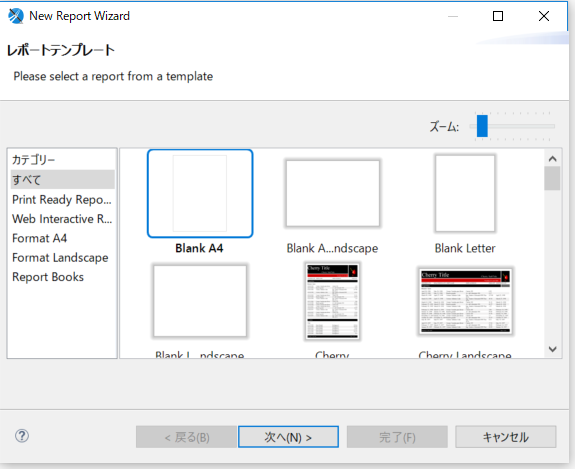
「Blank A4」を選択
※これは空のテンプレートです
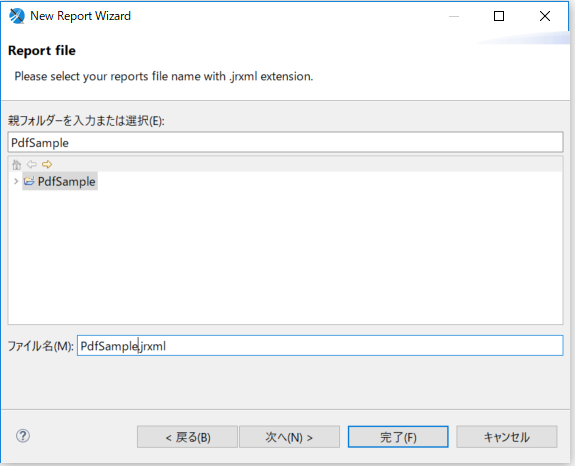
テンプレート名を決めて、完了
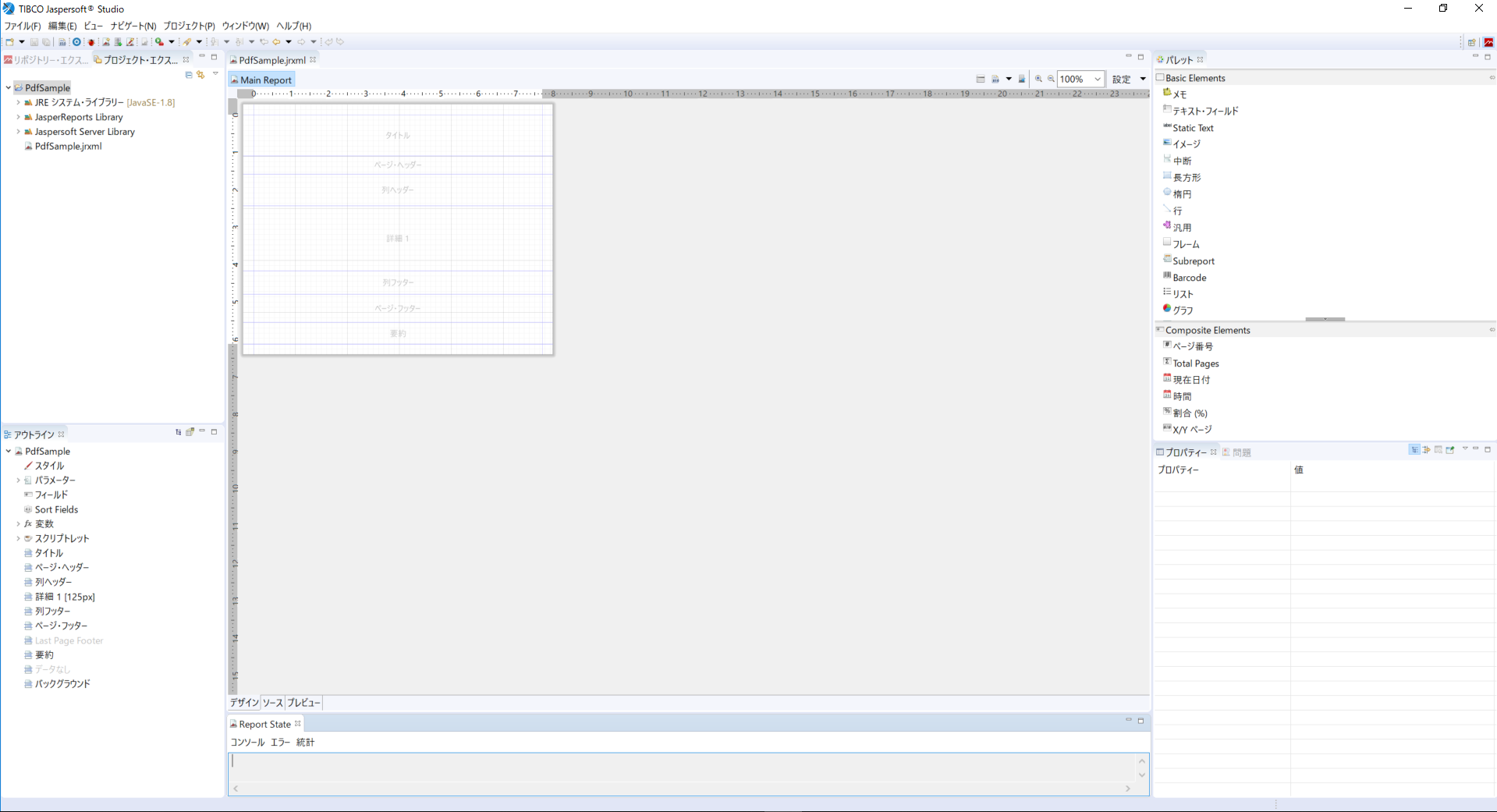
こんな感じになればOK
これで作成の準備は完了です!!
これでテンプレートの作成準備は完了です。
では、まずは基本操作と配置場所についての説明から。
特に配置場所については適当に置いてしまうと思い通りにテンプレートを作成することができないため、気を付けてください。
その名の通りタイトルを表示します。
複数枚のテンプレートを作成する場合は、ここに配置を行った要素は、1枚目のみ出力が行われます。
複数枚になるテンプレートを作成する際、ヘッダーとして設定した要素を配置します。
テーブルなどのヘッダーとして設定したい要素を配置します。
各項目の名前などを配置する場合はここに書くことになります。
テーブルのデータの内容や、今回領収書を作るので、支払った金額などを配置します。
基本的には、この詳細に配置することが多いです。
テーブルなどのフッターとして設定した要素を配置します。
例えば、テーブルの各項目の合計金額を表示したいとなれば、ここに書くことになります。
複数枚になるテンプレートを作成する際、フッターとして設定した要素を配置します。
ページ数などはここに書く場合が多いです。
文字や図形の配置を行う際に使用します。
各要素の詳細な設定を行うことができます。
文字の大きさや、文字の色の指定を行うことができます。
よく使うのは、主にこれぐらいになります。
領収書の作成では、紹介させていただいた基本操作の一部を利用するだけで作成が可能です。
まずは完成イメージです。
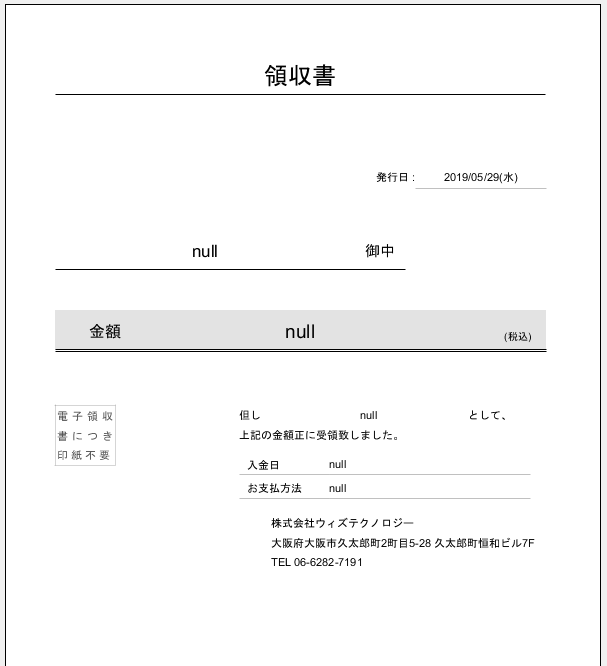
こんな感じで作成していこうと思います。
ちなみに”null”になっている部分は、後でJavaからパラメータを渡して金額や入金日を表示できるようにします。
まずはJavaからパラメータを受け取るためのフィールドを作成します。
画面左下のアウトラインタブから
「フィールド」を右クリック → 「フィールドの作成」
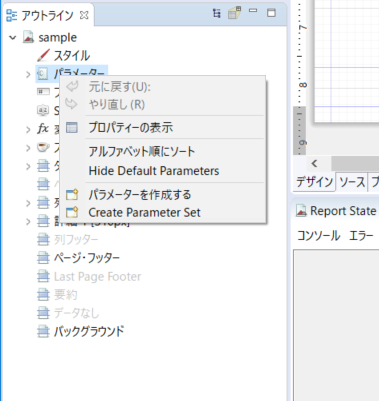
するとフィールドが画面右下に作成されます。
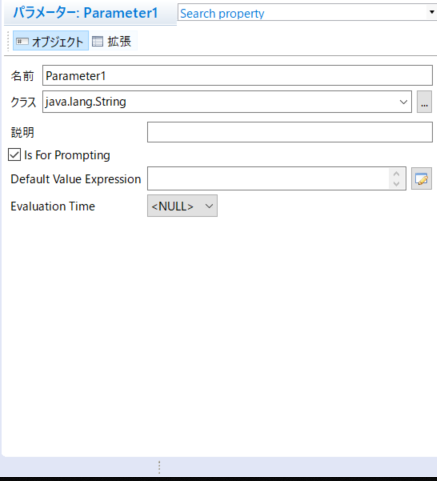
今回は合計で5つのフィールドを使用しますので、先に作成を終わらせたいと思います。
名前 : name
クラス: java.lang.String
名前 : amount
クラス: java.math.BigDecimal
名前 : remarks
クラス: java.lang.String
名前 : paymentDate
クラス: java.util.Date
名前 : paymentTypeName
クラス: java.lang.String
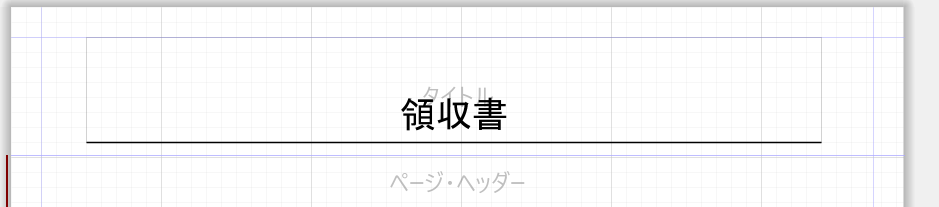
画面右上のパレットタブの中から「Static Text」をタイトルの部分にドラッグアンドドロップします。
値を設定するために、StsticTextをダブルクリックし、「領収書」と入力。
そのあと、プロパティ文字サイズや、下線を引いてこんな感じに
今回、複数ページでの出力は想定しないため
左下のアウトラインタブから
「ページヘッダー」をクリック → 削除
と進み、削除します。
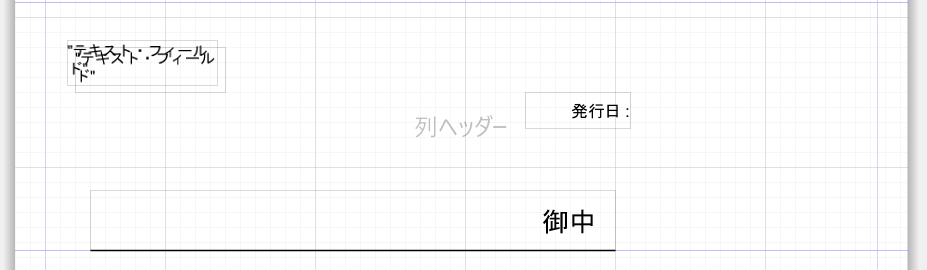
ここには、発行日、宛名を設定します。
画面右上のパレットタブの中から
「テキストフィールド」を2個
「Static Text」を2個
ドラッグアンドドロップします。
※テキストフィールドとStaticTextの違い
テキストフィールドは動的値、StaticTextは静的値です。
「発行日」、「御中」と入力しこんな感じで、配置を行う
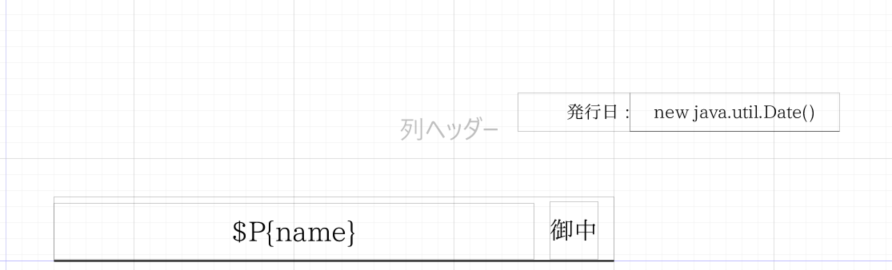
1つは先ほど作成した「name」フィールドを選択します。
もう1つは直接、「new java.util.Date()」とJavaのコードを記述します。
そのあと、文字の大きさや、配置をこんな感じに配置します。
まずは必要になる要素を用意します。
「Static Text」を10個
「テキストフィールド」を4個
ドラッグアンドドロップします。
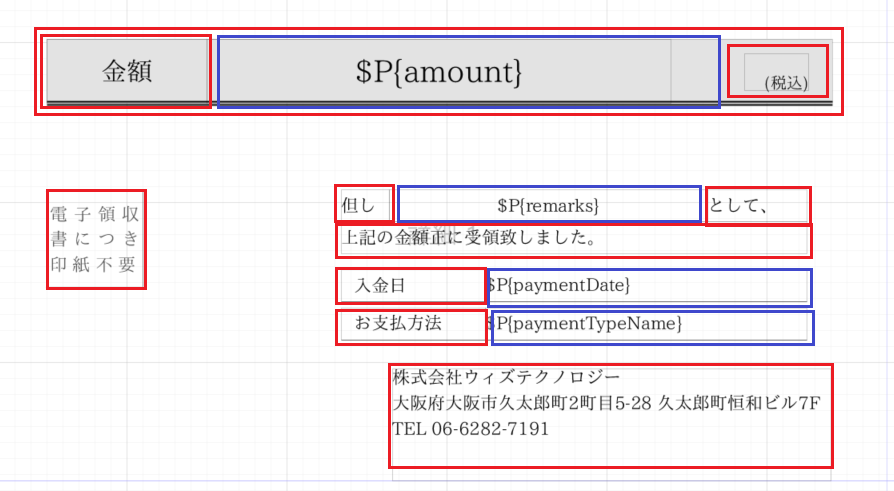
そして、上記の画像と同じように配置を行います。
「StaticText」は赤で
「テキストフィールド」は青で
色を付けていますので参考にしてください。
今回は使用しませんので、ページヘッダーの設定で行った削除を行ってください。
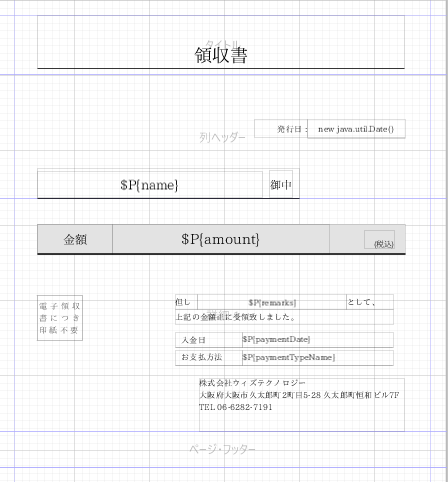
こんな感じで作成ができれば、テンプレートの完成です!!!
※罫線が多く感じますが、升目と各要素を示している線、独自で設定を行った罫線が混在しているためイメージと違うかもしれませんが、
出力を行う際は独自で設定を行った罫線のみ出力されるのでご安心ください。
作成したテンプレートをJava側から呼び出すために、ファイルを移動します。
移動しなくても大丈夫ですが、管理しにくくなる可能性があるので・・・
今回はCドライブの直下にフォルダを1つ作成し、そこに移動するようにします。
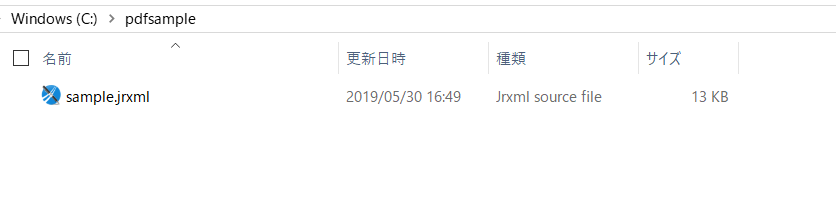
日本語で帳票を出力する場合、フォントの指定が必要になります。
今回は「IPAex明朝」というフォントを利用しますのでダウンロードを行います。
https://ipafont.ipa.go.jp/node26#jp
からダウンロードを行います。
.zipファイルでダウンロードされるので、解答を行います。
今回私は、Cドライブの直下に保存しました。
日本語文書を作成する際によく使用されるフォントで、
和文文字(仮名、約物、漢字)を固定幅、欧文文字を変動幅として単一のフォントに統一去れているのが特徴です。
プロジェクトの上で
「右クリック」→「プロパティ」
の順でクリック
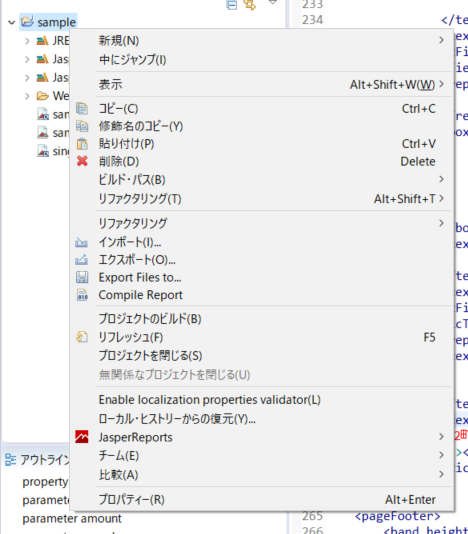
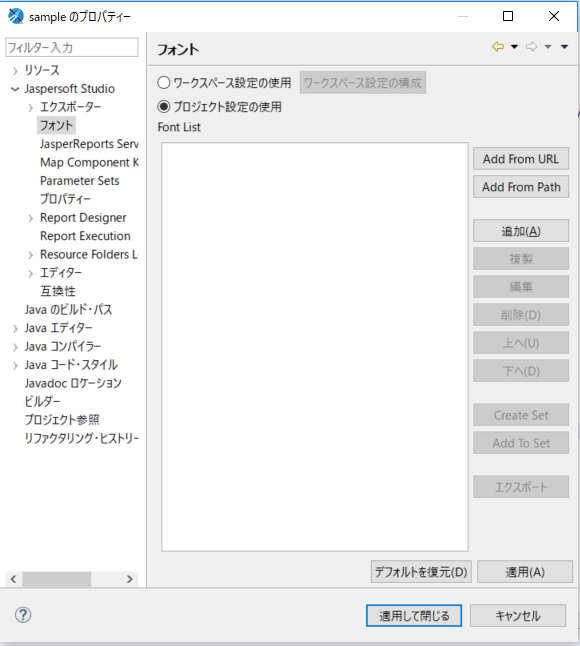
「JaspersoftStudio」→「フォント」→「追加」
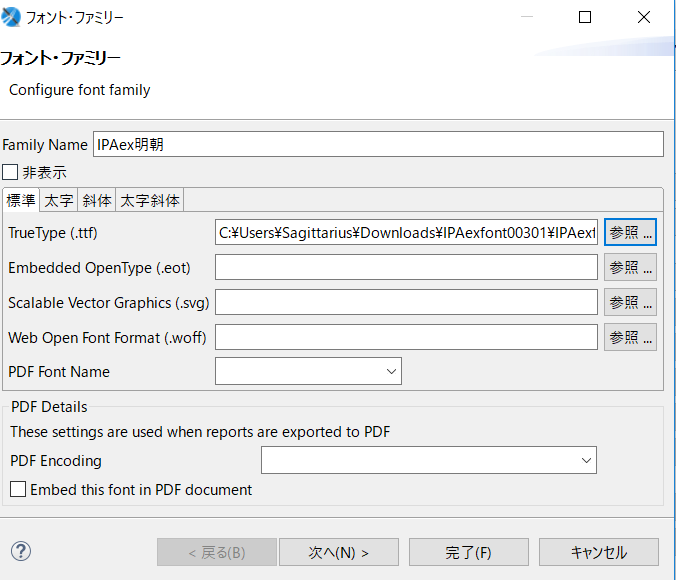
Family Name
IPAex明朝
「参照…」をクリックし、先ほどダウンロードし、解凍した.ttfファイルを選択し、完了をクリック
あとは各要素にフォントを設定します。
変更する要素をクリックし、右下のプロパティから、拡張をクリック
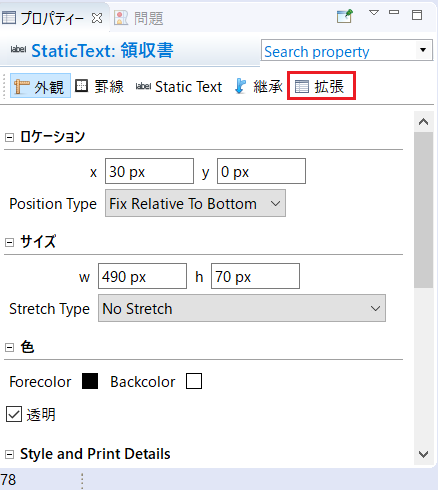
少し下にスクロールし、フォント名をクリックし、「IPAex明朝」を選択
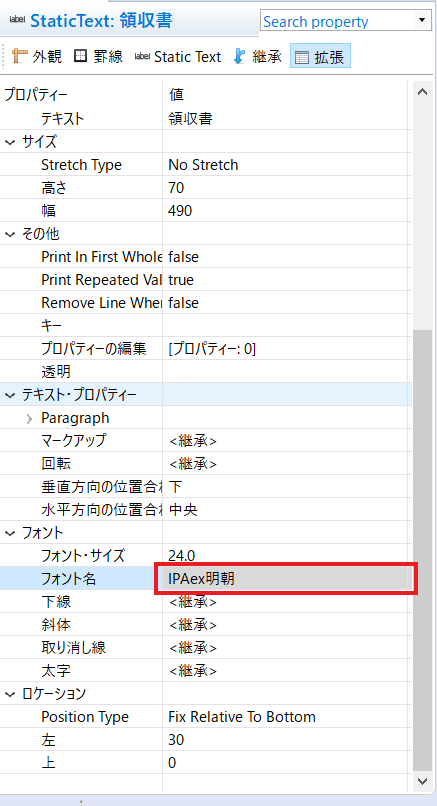
これを日本語で表示しないといけないところ全てに設定する必要があります。
完成形のjrxmlファイルのソースがこちらです。
<?xml version="1.0" encoding="UTF-8"?>
<!-- Created with Jaspersoft Studio version 6.6.0.final using JasperReports Library version 6.6.0  -->
<jasperReport xmlns="http://jasperreports.sourceforge.net/jasperreports" xmlns:xsi="http://www.w3.org/2001/XMLSchema-instance" xsi:schemaLocation="http://jasperreports.sourceforge.net/jasperreports http://jasperreports.sourceforge.net/xsd/jasperreport.xsd" name="sample" pageWidth="595" pageHeight="842" columnWidth="555" leftMargin="20" rightMargin="20" topMargin="20" bottomMargin="20" uuid="2b16eec6-4496-4c20-9298-aa55cc5b392d">
    <property name="com.jaspersoft.studio.data.defaultdataadapter" value="One Empty Record"/>
    <parameter name="name" class="java.lang.String"/>
    <parameter name="amount" class="java.math.BigDecimal"/>
    <parameter name="remarks" class="java.lang.String"/>
    <parameter name="paymentDate" class="java.util.Date"/>
    <parameter name="paymentTypeName" class="java.lang.String"/>
    <parameter name="Parameter1" class="java.lang.String"/>
    <queryString>
        <![CDATA[]]>
    </queryString>
    <background>
        <band splitType="Stretch"/>
    </background>
    <title>
        <band height="79" splitType="Stretch">
            <staticText>
                <reportElement positionType="FixRelativeToBottom" x="30" y="0" width="490" height="70" uuid="8333cb40-86ab-48fd-b5e7-93d0cd0df6dc"/>
                <box topPadding="5" leftPadding="5" bottomPadding="5" rightPadding="5">
                    <pen lineWidth="1.0" lineStyle="Solid"/>
                    <topPen lineWidth="0.0" lineStyle="Solid" lineColor="#000000"/>
                    <leftPen lineWidth="0.0" lineStyle="Solid" lineColor="#000000"/>
                    <bottomPen lineWidth="1.0" lineStyle="Solid" lineColor="#000000"/>
                    <rightPen lineWidth="0.0" lineStyle="Solid" lineColor="#000000"/>
                </box>
                <textElement textAlignment="Center" verticalAlignment="Bottom">
                    <font fontName="IPAex明朝" size="24" isPdfEmbedded="false"/>
                </textElement>
                <text><![CDATA[領収書]]></text>
            </staticText>
        </band>
    </title>
    <columnHeader>
        <band height="165" splitType="Stretch">
            <staticText>
                <reportElement x="30" y="125" width="350" height="40" uuid="e24868f6-65bd-4d61-bf07-e33c083be404"/>
                <box>
                    <pen lineWidth="1.0" lineStyle="Solid"/>
                    <topPen lineWidth="0.0"/>
                    <leftPen lineWidth="0.0"/>
                    <rightPen lineWidth="0.0"/>
                </box>
                <text><![CDATA[]]></text>
            </staticText>
            <staticText>
                <reportElement x="320" y="60" width="70" height="24" uuid="38073656-79c6-44f3-9ad3-aeb9b1275884"/>
                <textElement textAlignment="Right" verticalAlignment="Middle">
                    <font fontName="IPAex明朝" size="11" isPdfEmbedded="false"/>
                </textElement>
                <text><![CDATA[発行日 :]]></text>
            </staticText>
            <textField pattern="¤#,##0.###;¤(#,##0.###-)">
                <reportElement x="30" y="129" width="300" height="35" uuid="abfe4adb-ed0f-4b23-885a-faa9c160995b"/>
                <box>
                    <pen lineWidth="1.0" lineStyle="Double"/>
                    <topPen lineWidth="0.0" lineStyle="Solid" lineColor="#000000"/>
                    <leftPen lineWidth="0.0" lineStyle="Solid" lineColor="#000000"/>
                    <bottomPen lineWidth="0.0" lineStyle="Solid" lineColor="#000000"/>
                    <rightPen lineWidth="0.0" lineStyle="Solid" lineColor="#000000"/>
                </box>
                <textElement textAlignment="Center" verticalAlignment="Middle">
                    <font fontName="IPAex明朝" size="17" isPdfEmbedded="false"/>
                </textElement>
                <textFieldExpression><![CDATA[$P{name}]]></textFieldExpression>
            </textField>
            <staticText>
                <reportElement x="340" y="128" width="30" height="36" uuid="f9d5dbc7-a84b-4d12-a1dc-d5581dacc623"/>
                <box>
                    <pen lineWidth="1.0" lineStyle="Double"/>
                    <topPen lineWidth="0.0" lineStyle="Solid" lineColor="#000000"/>
                    <leftPen lineWidth="0.0" lineStyle="Solid" lineColor="#000000"/>
                    <bottomPen lineWidth="0.0" lineStyle="Solid" lineColor="#000000"/>
                    <rightPen lineWidth="0.0" lineStyle="Solid" lineColor="#000000"/>
                </box>
                <textElement textAlignment="Right" verticalAlignment="Middle">
                    <font fontName="IPAex明朝" size="15" isPdfEmbedded="false"/>
                </textElement>
                <text><![CDATA[御中]]></text>
            </staticText>
            <textField pattern="yyyy/MM/dd(E)">
                <reportElement x="390" y="60" width="131" height="24" uuid="17596721-8bc6-45cc-b116-5953c500ee33"/>
                <box>
                    <bottomPen lineWidth="0.25"/>
                </box>
                <textElement textAlignment="Center" verticalAlignment="Middle">
                    <font fontName="IPAex明朝" size="11"/>
                </textElement>
                <textFieldExpression><![CDATA[new java.util.Date()]]></textFieldExpression>
            </textField>
        </band>
    </columnHeader>
    <detail>
        <band height="310" splitType="Stretch">
            <staticText>
                <reportElement mode="Opaque" x="30" y="34" width="491" height="40" backcolor="#E3E3E3" uuid="25bc01f6-31c2-4bfa-a63a-4ac307f30032"/>
                <box>
                    <bottomPen lineWidth="3.0" lineStyle="Double"/>
                </box>
                <textElement>
                    <font fontName="IPAex明朝"/>
                </textElement>
                <text><![CDATA[]]></text>
            </staticText>
            <textField pattern="¤#,##0.### - ">
                <reportElement mode="Transparent" x="130" y="34" width="290" height="40" backcolor="#FFFFFF" uuid="134d63ff-fadb-4df0-8e1c-77b7a005680a">
                    <property name="com.jaspersoft.studio.spreadsheet.connectionID" value="f8c1ee2a-ea6b-4d73-959b-9f0abb0b6e6f"/>
                </reportElement>
                <box>
                    <topPen lineWidth="0.0" lineStyle="Solid" lineColor="#000000"/>
                    <leftPen lineWidth="0.0" lineStyle="Solid" lineColor="#000000"/>
                    <bottomPen lineWidth="0.0" lineStyle="Solid" lineColor="#000000"/>
                    <rightPen lineWidth="0.0" lineStyle="Solid" lineColor="#000000"/>
                </box>
                <textElement textAlignment="Center" verticalAlignment="Middle">
                    <font fontName="IPAex明朝" size="19" isPdfEmbedded="false"/>
                </textElement>
                <textFieldExpression><![CDATA[$P{amount}]]></textFieldExpression>
            </textField>
            <staticText>
                <reportElement x="30" y="34" width="100" height="40" uuid="db8aeda4-bbb8-40de-b78d-d27928bcbfa4"/>
                <box>
                    <topPen lineWidth="0.0" lineStyle="Solid" lineColor="#000000"/>
                    <leftPen lineWidth="0.0" lineStyle="Solid" lineColor="#000000"/>
                    <bottomPen lineWidth="0.0" lineStyle="Solid" lineColor="#000000"/>
                    <rightPen lineWidth="0.0" lineStyle="Solid" lineColor="#000000"/>
                </box>
                <textElement textAlignment="Center" verticalAlignment="Middle">
                    <font fontName="IPAex明朝" size="16" pdfEncoding="" isPdfEmbedded="false"/>
                </textElement>
                <text><![CDATA[金額]]></text>
            </staticText>
            <staticText>
                <reportElement x="466" y="43" width="40" height="23" uuid="5e4c6c6c-fcfa-4331-88ca-2e9f06cbe0af"/>
                <box>
                    <topPen lineWidth="0.0" lineStyle="Solid" lineColor="#000000"/>
                    <leftPen lineWidth="0.0" lineStyle="Solid" lineColor="#000000"/>
                    <bottomPen lineWidth="0.0" lineStyle="Solid" lineColor="#000000"/>
                    <rightPen lineWidth="0.0" lineStyle="Solid" lineColor="#000000"/>
                </box>
                <textElement textAlignment="Right" verticalAlignment="Bottom">
                    <font fontName="IPAex明朝" isPdfEmbedded="false"/>
                </textElement>
                <text><![CDATA[(税込)]]></text>
            </staticText>
            <staticText>
                <reportElement x="30" y="129" width="60" height="60" forecolor="#545454" uuid="a1b563dd-70ad-4e21-8cc4-c6c9f3930037"/>
                <box topPadding="2" leftPadding="2" bottomPadding="2" rightPadding="2">
                    <pen lineWidth="1.0" lineStyle="Solid"/>
                    <topPen lineWidth="0.25"/>
                    <leftPen lineWidth="0.25"/>
                    <bottomPen lineWidth="0.25"/>
                    <rightPen lineWidth="0.25"/>
                </box>
                <textElement textAlignment="Justified" verticalAlignment="Middle" rotation="None">
                    <font fontName="IPAex明朝" size="11" isPdfEmbedded="false"/>
                    <paragraph lineSpacing="1_1_2"/>
                </textElement>
                <text><![CDATA[電 子 領 収 書 に つ き 印 紙 不 要
]]></text>
            </staticText>
            <staticText>
                <reportElement x="214" y="128" width="30" height="20" uuid="5b7930ad-c61e-4dfa-b74b-62c481d8a189"/>
                <textElement textAlignment="Left" verticalAlignment="Middle">
                    <font fontName="IPAex明朝" size="11" isPdfEmbedded="false"/>
                </textElement>
                <text><![CDATA[但し]]></text>
            </staticText>
            <staticText>
                <reportElement x="443" y="128" width="62" height="20" uuid="65e2c04b-3fe6-4ece-bb69-45ea77b56f1f"/>
                <textElement textAlignment="Left" verticalAlignment="Middle">
                    <font fontName="IPAex明朝" size="11" isPdfEmbedded="false"/>
                </textElement>
                <text><![CDATA[として、]]></text>
            </staticText>
            <staticText>
                <reportElement x="214" y="148" width="291" height="20" uuid="23f82175-3e48-4b40-947f-ca693db78fa6"/>
                <textElement textAlignment="Left" verticalAlignment="Middle">
                    <font fontName="IPAex明朝" size="11" isPdfEmbedded="false"/>
                </textElement>
                <text><![CDATA[上記の金額正に受領致しました。]]></text>
            </staticText>
            <textField>
                <reportElement x="244" y="128" width="199" height="20" uuid="4858ecb2-2605-4eba-b52c-2b42a3e4025d">
                    <property name="com.jaspersoft.studio.spreadsheet.connectionID" value="c2140243-d0ea-4017-92d4-37b732f3d477"/>
                </reportElement>
                <textElement textAlignment="Center" verticalAlignment="Middle">
                    <font fontName="IPAex明朝" size="11" isPdfEmbedded="false"/>
                </textElement>
                <textFieldExpression><![CDATA[$P{remarks}]]></textFieldExpression>
            </textField>
            <staticText>
                <reportElement x="214" y="178" width="90" height="20" uuid="a59435ed-04ec-4dc3-a338-7030d4927a1b"/>
                <box topPadding="0" leftPadding="8" bottomPadding="0" rightPadding="0">
                    <pen lineWidth="0.25"/>
                    <topPen lineWidth="0.0" lineStyle="Solid" lineColor="#000000"/>
                    <leftPen lineWidth="0.0" lineStyle="Solid" lineColor="#000000"/>
                    <bottomPen lineWidth="0.25" lineStyle="Solid" lineColor="#000000"/>
                    <rightPen lineWidth="0.0" lineStyle="Solid" lineColor="#000000"/>
                </box>
                <textElement textAlignment="Left" verticalAlignment="Middle">
                    <font fontName="IPAex明朝" size="11" isPdfEmbedded="false"/>
                </textElement>
                <text><![CDATA[入金日]]></text>
            </staticText>
            <staticText>
                <reportElement x="214" y="202" width="90" height="20" uuid="7aa6f265-fb15-415c-aa1f-08c80ab666b5"/>
                <box leftPadding="8" bottomPadding="1">
                    <pen lineWidth="0.25"/>
                    <topPen lineWidth="0.0" lineStyle="Solid" lineColor="#000000"/>
                    <leftPen lineWidth="0.0" lineStyle="Solid" lineColor="#000000"/>
                    <bottomPen lineWidth="0.25" lineStyle="Solid" lineColor="#000000"/>
                    <rightPen lineWidth="0.0" lineStyle="Solid" lineColor="#000000"/>
                </box>
                <textElement textAlignment="Left" verticalAlignment="Middle">
                    <font fontName="IPAex明朝" size="11" isPdfEmbedded="false"/>
                </textElement>
                <text><![CDATA[お支払方法]]></text>
            </staticText>
            <textField pattern="yyyy/MM/dd">
                <reportElement x="304" y="178" width="201" height="20" uuid="39abd088-e7a3-4dfe-8257-70bcc58d2631">
                    <property name="com.jaspersoft.studio.spreadsheet.connectionID" value="c51de9c1-3309-474b-a858-bc897393079d"/>
                </reportElement>
                <box bottomPadding="1" rightPadding="0">
                    <pen lineWidth="0.25"/>
                    <topPen lineWidth="0.0" lineStyle="Solid" lineColor="#000000"/>
                    <leftPen lineWidth="0.0" lineStyle="Solid" lineColor="#000000"/>
                    <bottomPen lineWidth="0.25" lineStyle="Solid" lineColor="#000000"/>
                    <rightPen lineWidth="0.0" lineStyle="Solid" lineColor="#000000"/>
                </box>
                <textElement textAlignment="Left" verticalAlignment="Middle">
                    <font fontName="IPAex明朝" size="11" isPdfEmbedded="false"/>
                </textElement>
                <textFieldExpression><![CDATA[$P{paymentDate}]]></textFieldExpression>
            </textField>
            <textField>
                <reportElement x="304" y="202" width="201" height="20" uuid="6fe7e988-c072-4ec3-a428-da822125f09b">
                    <property name="com.jaspersoft.studio.spreadsheet.connectionID" value="547298a1-00b0-46db-8f71-08b3197f7bc9"/>
                </reportElement>
                <box bottomPadding="1">
                    <pen lineWidth="0.5"/>
                    <topPen lineWidth="0.0" lineStyle="Solid" lineColor="#000000"/>
                    <leftPen lineWidth="0.0" lineStyle="Solid" lineColor="#000000"/>
                    <bottomPen lineWidth="0.25" lineStyle="Solid" lineColor="#000000"/>
                    <rightPen lineWidth="0.0" lineStyle="Solid" lineColor="#000000"/>
                </box>
                <textElement textAlignment="Left" verticalAlignment="Middle">
                    <font fontName="IPAex明朝" size="11" isPdfEmbedded="false"/>
                </textElement>
                <textFieldExpression><![CDATA[$P{paymentTypeName}]]></textFieldExpression>
            </textField>
            <staticText>
                <reportElement x="246" y="240" width="274" height="70" uuid="ca7e3ef2-098a-4f3c-967e-534629858c9d"/>
                <textElement textAlignment="Left" verticalAlignment="Top">
                    <font fontName="IPAex明朝" size="11" isPdfEmbedded="false"/>
                    <paragraph lineSpacing="1_1_2" lineSpacingSize="0.0"/>
                </textElement>
                <text><![CDATA[株式会社ウィズテクノロジー
大阪府大阪市久太郎町2町目5-28 久太郎町恒和ビル7F
TEL 06-6282-7191]]></text>
            </staticText>
        </band>
    </detail>
    <pageFooter>
        <band height="49" splitType="Stretch"/>
    </pageFooter>
</jasperReport>
これで、テンプレートの作成の完了です。
https://jar-download.com/artifacts/net.sf.jasperreports/jasperreports
ここから、jarファイルのダウンロードを行うことができます。
バージョンは6.6.0を使用します。
Mavenでのダウンロードを行う場合は以下のコードをご利用ください。
<dependency>
     <groupId>net.sf.jasperreports</groupId>
     <artifactId>jasperreports</artifactId>
     <version>6.6.0</version>
</dependency>
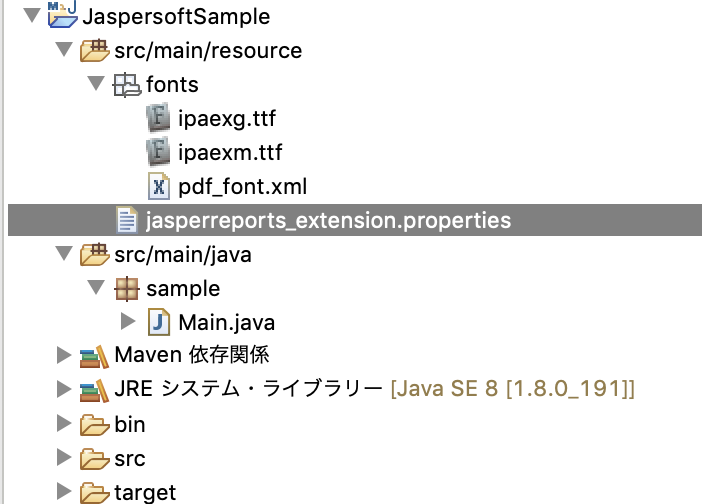
こんな感じでソースフォルダを作成します。
Main.javaのソースコードはこちらです。
import java.io.File;
import java.math.BigDecimal;
import java.util.Date;
import java.util.HashMap;
import java.util.Map;

import net.sf.jasperreports.engine.JREmptyDataSource;
import net.sf.jasperreports.engine.JasperCompileManager;
import net.sf.jasperreports.engine.JasperExportManager;
import net.sf.jasperreports.engine.JasperFillManager;
import net.sf.jasperreports.engine.JasperPrint;
import net.sf.jasperreports.engine.JasperReport;

public class Main {

    public static void main(String[] args) {

        Map<String, Object> parameters = getParams();
        try {
            File jrxmlFile = new File("C:\\pdfsample\\sample.jrxml");
            JasperReport report = JasperCompileManager.compileReport(jrxmlFile.getAbsolutePath());
            JasperPrint jasperPrint = JasperFillManager.fillReport(report, parameters, new JREmptyDataSource());
            JasperExportManager.exportReportToPdfFile(jasperPrint, "receipt.pdf");
        } catch (Exception e) {
            e.printStackTrace();
        }

        System.out.println("終了しました");

    }

    /**
     * PDF出力の際に使用するパラメータを取得
     *
     * @return
     */
    private static Map<String, Object> getParams() {
        Map<String, Object> params = new HashMap<>();

        params.put("name", "ウィズテクノロジー");
        params.put("amount", new BigDecimal(1000000));
        params.put("remarks", "保守費用");
        params.put("paymentDate", new Date());
        params.put("paymentTypeName", "現金");

        return params;
    }

}
new File("C:\\pdfsample\\sample.jrxml")の引数にはJaspersoftで作成.jrxmlファイルまでのパスを指定します。
今回は、先ほどjrxmlファイルを移動した先を指定しています。
また、exportReportToPdfFile(jasperPrint, "receipt.pdf")の第2引数のは出力するPDFファイルのファイル名を指定しています。
eclipse側でもフォントの設定をしないと、日本語の出力を行うことができないため、設定を行います。
fontsフォルダの中には先ほどダウンロードしたフォントを配置します。
pdf_font.xml
<?xml version="1.0" encoding="UTF-8"?>
<fontFamilies>
  <fontFamily name="IPAex">
    <normal>fonts/ipaexg.ttf</normal>
    <pdfEncoding>Identity-H</pdfEncoding>
    <pdfEmbedded>true</pdfEmbedded>
  </fontFamily>
  <fontFamily name="IPAex">
    <normal>fonts/ipaexm.ttf</normal>
    <pdfEncoding>Identity-H</pdfEncoding>
    <pdfEmbedded>true</pdfEmbedded>
  </fontFamily>
</fontFamilies>
jasperreports_extension.properties
net.sf.jasperreports.extension.registry.factory.fonts=net.sf.jasperreports.engine.fonts.SimpleFontExtensionsRegistryFactory
net.sf.jasperreports.extension.simple.font.families.ipaex=fonts/pdf_font.xml
これで、Main.javaを起動すると、PDFファイルがJapaプロジェクトのフォルダの中に、PDFファイルが作成されます。
どうでしたか?
うまくPDFファイルが出力されたでしょうか?
あとは、出力する場所を設定したり、Webからのリクエストに対してダウンロードしたり、色々活用してください!
最後までお読みくださり、ありがとうございました。
☆☆☆ 新しいことにチャレンジしたい!仲間と一緒に成長したい!やりがいのある仕事で充実した毎日を過ごしたい!そんな熱意をお持ちの方、私たちと一緒に働きませんか?ウィズテクノロジーでは一緒に働いていただけるエンジニアを大阪・東京で募集しています。☆☆☆